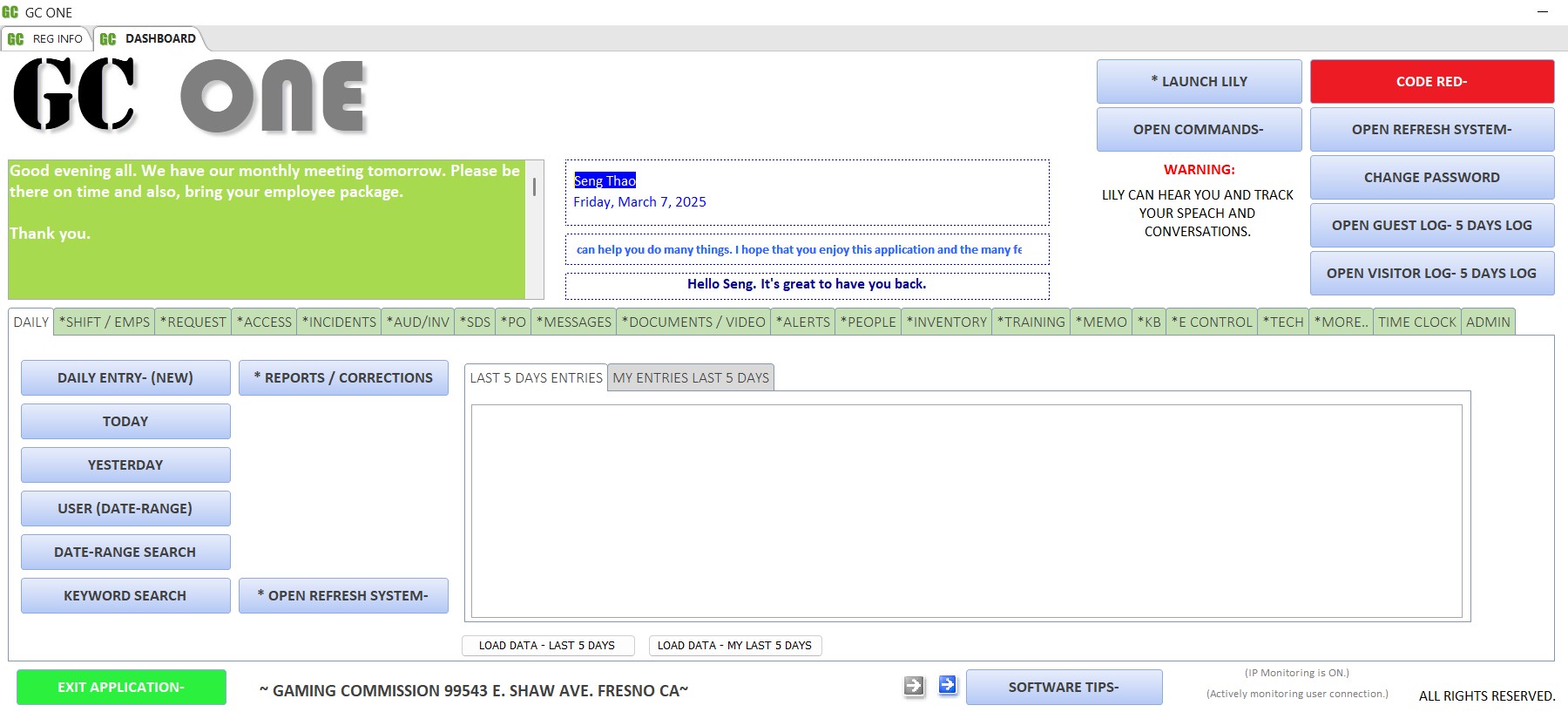
What GC ONE does
One application manages the daily work of an entire department or organization, from logs and incidents to hearings, budgets and emergency alerts. Version 2024, 2025, 2026 and later are designed for an Azure remote desktop environment.
Built from real operations
Created by Seng Thao for 24/7/365 casino surveillance and GSOC, after finding that available software was costly, did not fit department needs and could not be customized. Early versions ran at more than three casinos and many other industries.
Designed for regulation
Built to support NIGC minimum internal controls and to help organizations meet state, federal, tribal and international requirements, with audit logs, alerts and reporting throughout.
OSHA compliance management
Tracks Safety Data Sheets with an NFPA diamond, OSHA incident reporting, permit-to-work (hot, cold, confined space), inspection logs, certifications and training in one place.
Works beyond casinos
Now used across industries as a management and operational tool, including call centers, loss prevention, project teams, OSHA management and small or large businesses.
Why it was built
Few options
Very few applications existed for the casino surveillance department. Very little analytics and reporting. With over 18 years of experience, working, consulting and designing applications for the gaming industry including but not limited to Title 31 application, casino applications, gaming commission apps and Tribal government apps.
Too costly, poor fit
Available software was extremely expensive, and software aimed at the department did not meet its requirements. GC One is free with an a paid option to purchase a registration key that places your company name on all the reports. Registration is not required.
No adaptation
Adaptation was nonexistent, so GC ONE was built to exceed regulatory requirements and bring in advanced analytics and process improvement methods from the gaming industry and other successful industries. If data is gold then you should be able to use those data to make smart decisions.
How it grew
GC ONE began in 2002 as a database for a casino surveillance department. It grew to manage compliance, auditing, investigations, security, gaming commissions, tribal government, GSOC, tribal police, management teams, call centers, small and large businesses, loss prevention, operational centers, project management, OSHA management, time clock and casino operations. The 2024 to 2026 versions added the Lily voice assistant and Azure desktop support.
Who uses it
- Gaming commissions and gaming regulatory agencies
- Tribal government and Tribal Council (hearing process)
- Tribal police
- Fintech
- Investigators
- Casino surveillance, security and operations
- Compliance, auditing and investigations
- Global security operations centers (GSOC)
- Security Operations
- Management teams and departments
- Loss prevention and operational centers
- Project management and OSHA compliance teams
- Call centers and small or large businesses
- Tech ticketing system
Get access: free, with approval
GC ONE is a free application. Because it is also active and purchasable in different industries, download and use are limited to approved users and companies. Contact us.
No subscription needed. You do not need to subscribe to the secure portal to download the application, and you do not need to register it.
Registration is optional. Registering with a key places your company name on all reports. Email sengthao@gmail.com to purchase a registration key.
How to be approved. The full download is in the secure portal and the file is password protected. Email sengthao@gmail.com with your request. Requests from executive management, owner operators, gaming commissions, government entities and other upper management are normally approved.
A portal subscription is not needed and adds access to other applications.
GC ONE has no monthly or annual fees. It is a full version, no limit, free to use application. The only purchase that is available is for a registration key that is optional but is not required.
Security built into many layers
Many additional security protocols are not listed here. We can help setup it up for you or you can follow the readme file. You don't need a giant costly server. Run it off one Windows pc if you like.
| Key file | A key file is required to open the app, with SHA1 verification. |
|---|---|
| Rotating PIN | A daily rotating PIN from the PIN generator app is required, with SHA2 verification. |
| Passwords | User name and password with salt and pepper required. SHA256 hashing with 20,000 iterations to deter brute force attacks. |
| Lockouts | NIST-standard login attempt lockout, plus IP restricted lockout and IP identification. |
| Encryption | Frontend and backend encryption. Windows server messaging block enabled on the server. |
| Custom security | Internal custom security implementations built into the application, and an audit-friendly design that logs activities and access. |
| Access modes | Restricted Guest Request mode and Visitor mode. User, supervisor and admin roles, with admin module locks. |
| Logging | Key PIN log and user login log. Audit view log tracks data modifications and application changes. Footprint log tracks access to sensitive areas with color codes. |
| Communication | System-wide admin messages on all user dashboards. Code Red alert triggers an emergency alert to all users. |
| Network tools | IP6, IP4 and net user commands let users view their current status. |
| Azure | Designed for Azure remote desktop workflows. Dedicated desktops are recommended over pooled. |
Lily voice assistant
Lily listens, answers with voice, and opens, closes and runs commands in the application. Earlier versions used a voice assistant named Yuna. Lily requires Python version (see the installation video or readme file).
Example: a user says "Lily, Code 31." Lily confirms by voice, starts the Code 31 protocol, flashes the Code 31 alert on every dashboard and opens the emergency procedures.
Application modules
Categories, locations and lists are customizable by the end user in most modules.
Daily operations
- Daily
- Logs employee inputs for daily activity tracking, with shift reports, keyword search, date-range search and reporting.
- Shift
- Tracks shift schedules, with date range, employee search and reports.
- Request
- Tracks department requests with automatic key retrieval assignment, approvals, results, documents, advanced search, smart updates and analytical reports.
- Access
- Area access tracking with date range, key search, easy view, reports and corrections.
- Guest Request
- Loads the application in a restricted mode as a request input system.
- Visitor and visitor count
- Loads the application as a visitor tracking system, plus door counts that estimate visitors on property and calculate current and historical counts to justify staff deployment.
- Messages
- Internal messaging with mass and user-specific messages, group chats, search and a float view.
- Memo
- Tracks internal and external memos with keyword and issuer search, datasheet view and corrections.
- My To Do List
- Employee to-do lists and job requirements. If an employee is absent, their duties are recorded and can be reassigned.
- Time Clock
- Time in and out, hours, breaks, lunch and time off, with reports.
Incidents, investigations and evidence
- Incidents
- The main reporting module. Categories, license plate search, medical reports, NIGC and theft reports, OSHA reporting, department filtering, smart views, datasheet filtering, and links to video and digital documents.
- Audit and Investigation
- Tracks all audits and investigations with reporting and advanced search.
- Close Watch
- Escalation tool to track and document close investigations.
- People
- Tracks suspects, photos, names, keywords and exclusions, with full profile reports including photos. A flash mode trains employees on facial recognition and status.
- Evidence Control
- Manages evidence collection and chain of custody with date range search and reporting.
- Jackpot
- Tracks jackpots for investigations and documentation.
- Gaming Items Card Control
- Chain of custody for cards, chips, dice, markers, CPUs, RAM, slot controllers and other items that must be secured.
- Slot Management
- Tracks slot locations, machines, manifests, shipping, documents, certifications and changes. Locations, models, makes and classes are customizable.
Compliance, safety and regulatory tracking
- Alerts
- Due-date alerts by type and category with attached documents, user captures and status updates. Color coded: orange when 30 days approach, red when past due. Ideal for time-based regulatory requirements.
- Safety Data Sheet (SDS)
- OSHA and compliance SDS tracking with an integrated NFPA diamond, health, fire, specific hazard and instability points, document and video links, location and inspection logs.
- Certification
- Tracks medical, CPR, driver and employee certifications and inspections, with color-coded expiration alerts and department search.
- Payment
- Tracks incoming and outgoing payments with color-coded alerts for pending and past-due items. Suited to time-sensitive regulatory payments.
- Dispute
- Dispute resolution tracking with search, alerts, amounts, categories, logs, documents and analytical reports.
- Action and Hearing
- Case management for actions (fines, sanctions, regulatory punishments) and hearings (case and legal reviews) in tribal government, gaming commission or corporate settings, with alerts and analytical reports.
- Emergency Contact and Procedures
- Ready-to-use emergency contacts and procedures with document links for immediate access.
Business management
- Purchase Order
- Purchase orders, approvals, types and statuses, expense reports, corrections and analytical reports. Monthly budget alerts with automatic reset, a quick visual budget view and pending PO access.
- Inventory
- Active and inactive items, check in and out, user checkouts, serial number search and datasheet filtering.
- Vendor
- Authorized vendor information and status verification, vendor transactions, alerts, ad hoc commands and analytical reporting.
- Technician
- A large, password-protected module that manages the entire technician request process: pending and completed requests, updates and smart updates, searches, categories, percentage complete, inventory controls, special work approvals and OSHA permit-to-work tracking (hot, cold, confined space and other permits), priority alerts, application user login, guest and supervisor access, application tracking and logs, My To Do List, security PIN, application lock view, the projects section and advanced analytical reports. Tech ticketing system and inventory controls.
- Project
- Project and collaboration management with status, percentage, due dates and alerts. Includes tips such as fishbone, Pareto principle and 5 Whys.
- Documents and Video
- Searchable links to documents and videos on the network, usable as archive storage.
- Knowledge Base
- Department and sub-department knowledge base with clickable links to records and documents.
- My Tip
- Tracks tips and procedures.
People and performance
- Training
- Tracks employee training and training materials with easy access, a float view, analytical reports and a restricted view so each user sees only their own training.
- Wellness Check
- Lets admins see department status. A supplemental app analyzes the data to guide future improvements.
- Management Log, Appraisal and Disciplinary
- Management logging, appraisals and disciplinary tracking. There are two sections, internal and external tracking.
- DMAIC
- Tracks forward plans and improvement processes.
- Supervisor
- Used by supervisors to add users, track logs, track application changes, and make restricted, limited changes to data.
- Admin
- Holds all the advanced commands and controls of the application for the administrator, including module locks, system-wide messages and Code Red alerts.
- Import and export
- Excel import and export, including incident report aggregation from remote locations for data analysis.
Supplemental applications
About a dozen companion apps are included.
- SHA1, SHA2 and SHA3 hashing apps
- GC ONE Pin Generator
- Unique password generator
- Password Keeper
- DB password extractor
- GC ONE frontend and backend apps
- Lily Assistant (Python required)
- Employee projection app
- Agent Long and others
Training videos
Learn more on the Thugon Developments YouTube channel.
Frequently asked questions
Is GC ONE really free?
Yes. The application is free and needs no subscription. It is the full version and unlimited use. Download is restricted to approved users and companies, so you must request approval first. The only purchase option is for a registration key that will place your company name on the printable reports. Registration is not required.
Who gets approved?
Requests from executive management, owner operators, gaming commissions, government entities and other upper management are normally approved.
What does registering the application do?
Registration is optional and not required. It places your company name on the application and all reports. You can also purchase a support and training plan also. There is no monthly or annual fees. It's a one time flat fee.
Can Tribal Councils use it?
Yes. The Action and Hearing module supports hearing and case management for tribal government, gaming commissions and corporate environments.
Does it work on Azure?
Versions 2024, 2025 and 2026 are designed for Azure remote desktop workflows. Dedicated desktops are recommended instead of pooled.
Can it be used for OSHA compliance?
Yes. It includes SDS tracking with an NFPA diamond, OSHA incident reporting, permit-to-work tracking, inspection logs, certification tracking and training records.
How do I contact you?
Email sengthao@gmail.com.
Is it only for casinos?
No. It is a versatile management and operations tool used across industries. GSOC, dental office, operational center, trucking office, call centers, security center and etc. It's an operational management tool so you don't need to use all the modules.